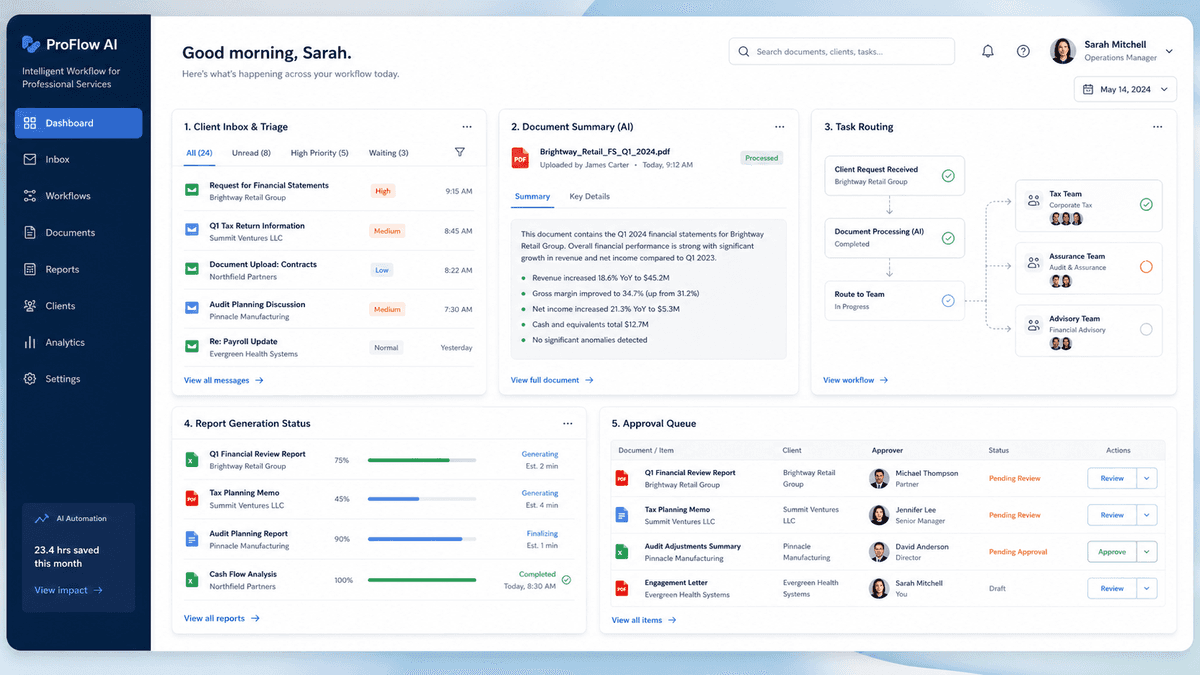
Professional services dashboard showing AI-assisted inbox triage and client onboarding automation

AI Workflow Automation for Professional Services Firms

Your clients pay for judgement, not for senior people to chase documents, tidy meeting notes, or rebuild the same proposal from scratch.

In professional services, a surprising amount of expert time disappears into onboarding, contract review, meeting admin, and proposal drafting.

The best workflow is usually the one that prepares the routine material properly, then hands it back to a fee-earner for the judgement only they can provide.

Common Operational Pain Points

Where professional services teams lose time

Client onboarding takes days instead of hours

KYC checks, ID verification, and document collection stretch across emails, spreadsheets, and manual data entry. New clients wait, and fee-earners chase paperwork instead of billing.

Contract review is a bottleneck

Every NDA, MSA, and engagement letter needs a senior review. Partners spend hours on first-pass markup that follows the same playbook every time.

Meeting follow-up falls through the cracks

Action items from client calls get lost between note-taking, CRM updates, and email follow-ups. Fee-earners spend hours on admin that should take minutes.

Proposals take days to assemble

Teams rewrite proposals from scratch instead of drawing on past work. Slow turnaround costs winnable deals, especially on competitive tenders.

How It Works

What the Workflow Could Look Like

These examples show the sequence of work, not a fixed product. The real version would follow your systems, rules, and exceptions.

KYC & Client Onboarding

Trigger: New client engagement signed

  1. 1AI extracts fields from ID documents, utility bills, and company filings
  2. 2Cross-checks against sanctions lists and compliance databases
  3. 3Populates CRM and practice management system automatically
  4. 4Flags incomplete or mismatched records for human review
  5. 5Sends client a status update when onboarding is complete
What changes

Onboarding cycle drops from days to hours

Contract Review & Redlining

Trigger: Incoming contract or engagement letter received

  1. 1AI compares clauses against your firm's standard playbook
  2. 2Flags non-standard terms with risk grade and suggested counter-clause
  3. 3Produces a structured redline for fee-earner to accept or override
  4. 4Tracks negotiation positions across the deal lifecycle
What changes

A consistent first pass against the firm's playbook

Meeting Notes → Actions → CRM

Trigger: Client meeting ends

  1. 1Call recording transcribed and structured automatically
  2. 2Action items, decisions, and key dates extracted
  3. 3CRM updated with meeting summary and next steps
  4. 4Follow-up tasks assigned to the right team members
What changes

Meeting notes and follow-up actions are prepared for review

Professional Services

Five Workflows Worth Examining

Use these as a shortlist, not a shopping catalogue. The right first project depends on where your team loses time and how often the process repeats.

1

KYC & client onboarding document processing

Extract structured fields from passports, utility bills, articles of association, and ID & V documents. Cross-check against sanctions lists and write a clean record into your CRM or practice management system.

2

Contract & engagement-letter review assistant

Compare incoming NDAs, MSAs, and engagement letters against your firm's playbook. Output a redline with the position, risk grade, and a suggested counter-clause your fee-earner can accept or override.

3

Meetings → action items → CRM

Record (with consent), transcribe, and structure client calls into action items, decisions, and CRM updates. The fee-earner reviews and approves rather than typing notes.

4

Lead research & enrichment

Take a lead list or inbound form, enrich each company with public-source firmographics, news triggers, and likely buying intent, and prioritise the list for the BD team.

Read the case study
5

Proposal drafting from past engagements

Searches your library of past proposals, statements of work, and capability statements to draft a first version tailored to the new client brief. Fee-earner edits and signs off.

Professional Services — frequently asked questions

We're regulated (FCA / SRA / ICAEW) — will the AI be compliant?+
We design for your regulator's expectations: data residency, audit logging, human-in-the-loop for any client-facing output, and full traceability of which document fed which AI decision. We've supported firms through ICO and FCA reviews of AI tooling.
Will partners actually use it, or will it sit unused?+
We design the human-in-the-loop step into the partner's existing tool — Word, Outlook or the CRM — rather than asking them to learn a separate app. Adoption is measured during the pilot before rollout.
How is data protected?+
UK / EU hosting, no third-party LLM training on your data, SSO + role-based access, and full audit trail of every prompt and response. We can deploy fully behind your firewall where required.
Can it draft client advice?+
We deliberately don't deploy AI that produces final client advice. We deploy AI that drafts, extracts, and summarises so the fee-earner's expertise goes into the judgment call, not the typing.

How We Work

From a Frustrating Process to a Working Workflow

We map what really happens, build a small version, and let your team try it on real work before anyone commits to a larger rollout.

  1. 01

    Workflow Review

    We map the manual process end-to-end: systems involved, current time cost, error points, and business impact.

    60–90 minutes
    Workflow map and automation opportunity summary
  2. 02

    Bottleneck Prioritisation

    We select the workflow with the strongest mix of pain, feasibility, and measurable ROI — so you start where it matters most.

    2–3 working days
    Prioritised workflow and success criteria
  3. 03

    Prototype Build

    We build a small AI-assisted workflow using your sample data, screenshots, exports, or existing documents. No dummy demos.

    10–14 working days
    Working prototype or interactive demo
  4. 04

    Human Review and Controls

    We add review points, exception handling, confidence thresholds, and fallback rules — so nothing runs unsupervised until you trust it.

    Included in prototype
    Controlled workflow ready for pilot
  5. 05

    Pilot and Measurement

    We test the workflow with real users and measure time saved, errors reduced, and adoption issues before scaling anything.

    2–4 weeks
    Pilot report and scale recommendation
  6. 06

    Deploy or Improve

    We scale the workflow and integrate it properly — or stop if the numbers do not justify further spend. No lock-in.

    Based on pilot results
    Deployment plan or improvement backlog

Practical and Proven

A structured approach focused on real business outcomes.

Human-Centred by Design

Automation with the right controls, transparency, and accountability.

Continuous Value

Measure, learn, and improve — so your operations keep getting better.

Free Professional Services Workflow Audit

30 minutes. We identify your most time-consuming unbillable workflow, estimate the hours you can recover, and tell you honestly whether automation is worth it for your firm.

Request Your Free Audit