1
Shipment tracking consolidation & exception alerts
Ingest tracking updates from carriers (email, API, EDI, portal scrape), normalise into a single timeline per shipment, and alert operations only when something is off-track or needs action.
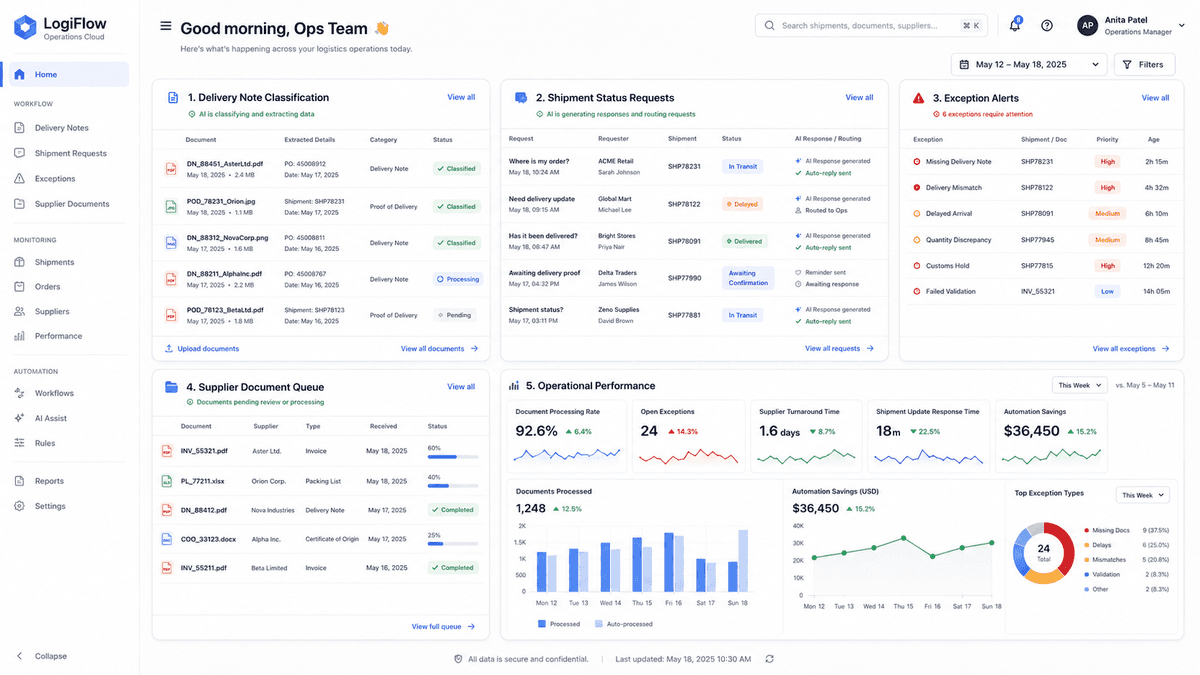
Shipment updates, supplier messages, and warehouse exceptions already exist. We help the right information reach the right person before the customer has to ask.
Logistics and supply chain businesses run on coordination — between warehouses, carriers, suppliers, and customers. The pain isn't a lack of data; it's that data sits in emails, spreadsheets, carrier portals, and WMS screens that don't talk to each other.
We deploy AI that bridges those systems: reads the shipment update, matches it against the order, flags the exception, and tells the right person before the customer calls to complain.
Common Operational Pain Points
Tracking updates arrive via email, carrier portals, EDI, and phone calls. Operations staff spend hours consolidating status across systems instead of managing exceptions.
Every booking confirmation, delay notification, and ETA request is a separate email or call. The same information gets re-keyed across WMS, TMS, and customer-facing systems.
Goods arrive with packing lists that don't match the PO. Staff manually check, count, and reconcile before anything hits the system — creating bottlenecks at the dock.
Customers call or email asking 'where's my order?' and staff scramble across systems to find an answer. Response time is slow and inconsistent.
How It Works
These examples show the sequence of work, not a fixed product. The real version would follow your systems, rules, and exceptions.
Trigger: Carrier tracking update received (email, API, or EDI)
Exceptions caught hours earlier, fewer customer complaints
Trigger: Delivery arrives at warehouse dock
Receiving throughput doubles with fewer put-away errors
Trigger: Customer asks 'where's my order?' via email or chat
Customers get answers in seconds instead of hours
Logistics & Supply Chain
Use these as a shortlist, not a shopping catalogue. The right first project depends on where your team loses time and how often the process repeats.
Ingest tracking updates from carriers (email, API, EDI, portal scrape), normalise into a single timeline per shipment, and alert operations only when something is off-track or needs action.
Auto-generate booking confirmations, delay notifications, and ETA requests based on order status changes. Route supplier responses to the right internal team with structured context.
Read packing lists (paper or digital), match against PO and ASN data, flag quantity or item discrepancies before goods are put away. Clean receipts auto-post to the WMS.
An AI agent that answers 'where's my order?' from your tracking data, proactively notifies customers of delays, and escalates complex queries to a human with full context.
Forecast model that combines sales history, supplier lead times, and seasonal patterns to recommend reorder points and safety stock levels across your SKU range.
How We Work
We map what really happens, build a small version, and let your team try it on real work before anyone commits to a larger rollout.
We map the manual process end-to-end: systems involved, current time cost, error points, and business impact.
We select the workflow with the strongest mix of pain, feasibility, and measurable ROI — so you start where it matters most.
We build a small AI-assisted workflow using your sample data, screenshots, exports, or existing documents. No dummy demos.
We add review points, exception handling, confidence thresholds, and fallback rules — so nothing runs unsupervised until you trust it.
We test the workflow with real users and measure time saved, errors reduced, and adoption issues before scaling anything.
We scale the workflow and integrate it properly — or stop if the numbers do not justify further spend. No lock-in.
A structured approach focused on real business outcomes.
Automation with the right controls, transparency, and accountability.
Measure, learn, and improve — so your operations keep getting better.
30 minutes. We review your biggest operational bottleneck — whether it's tracking, receiving, or customer queries — estimate the savings, and tell you honestly whether automation is worth it.
Request Your Free Audit